

Running reports
The Reporting hub is the practice’s analytics surface — every report the system ships with lives here, organized into clinical, operational, billing, and audit categories.
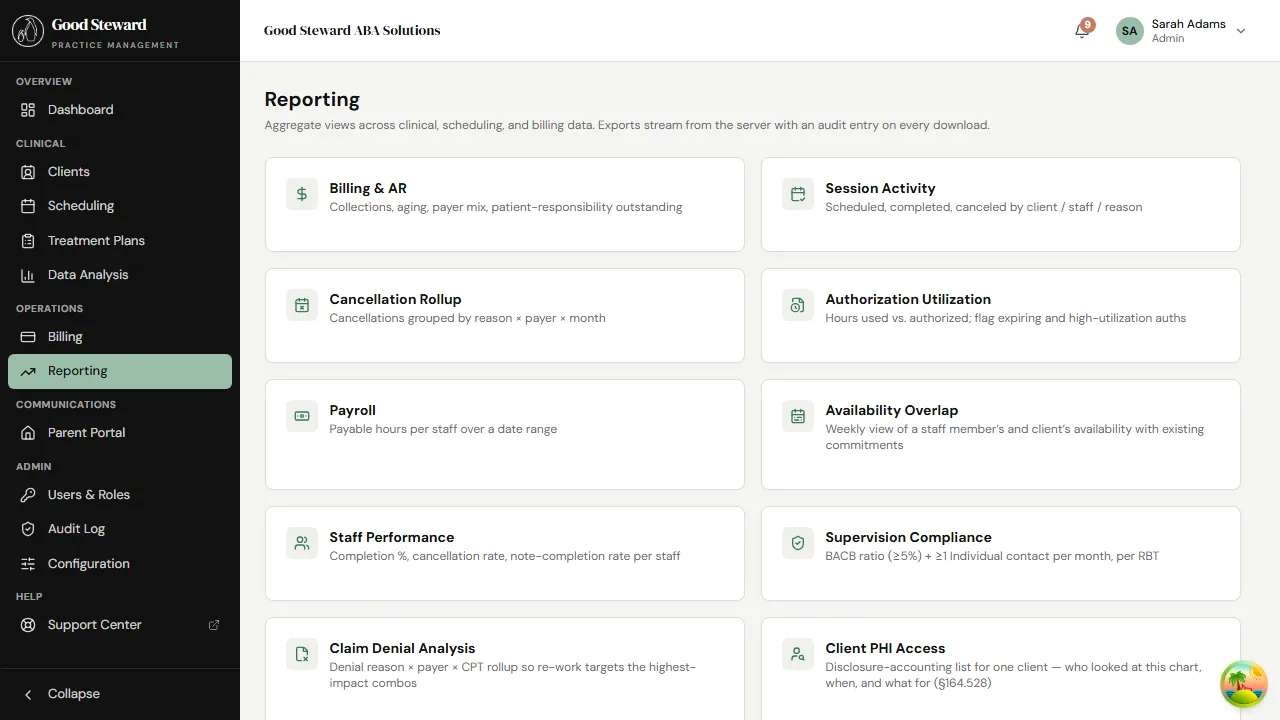
How reports work
Section titled “How reports work”All reports follow the same pattern:
- Filters at the top — date range, client, payer, staff, and so on. Different reports expose different filters.
- KPI cards — the headline metrics, with trend indicators where applicable.
- Detail table — the row-level data backing the KPIs.
- Export CSV — every report exports to CSV. Exports are generated server-side and audited (the request shows up in the Client PHI Access report when the export contains PHI).
Reports honor the caller’s permissions — a BCBA scoped to assigned
clients only sees their assigned clients in any per-client report;
a billing user without view_clinical_data doesn’t see clinical
reports in the hub.
Clinical reports
Section titled “Clinical reports”Goal Mastery
Section titled “Goal Mastery”Tracks each client’s program targets — In Progress, Mastered, On Hold, Discontinued — with a % Mastered ratio and a “Mastered in window” cohort metric. Used for reauth packets, parent updates, and quarterly reviews.
Auth Utilization
Section titled “Auth Utilization”Per-authorization, the number of units used vs. authorized, with a projection of when the auth will run out at the current burn rate. The 60% / 80% / 90% bar colors flag when it’s time to start the reauth process.
Supervision Compliance
Section titled “Supervision Compliance”Tracks BACB-required supervision hours per RBT — the 5% rule (supervision hours ≥ 5% of direct service hours), the monthly “individual contact” requirement, and any RBTs falling below the bar. Run this monthly before payroll.
Operational reports
Section titled “Operational reports”Session Activity
Section titled “Session Activity”Every scheduled session in a date window with status (Scheduled / Complete / Cancelled / No Show). Filter by staff, client, or session type. Use it to drive operational reviews — cancellation rate, fill rate, missed check-ins.
Cancellation Rollup
Section titled “Cancellation Rollup”Cancellations grouped by reason code, broken down by staff and client. Spots patterns (“client X cancels every Friday”, “staff Y cancels at 3x the practice average”) that aren’t visible in single sessions.
Availability Overlap
Section titled “Availability Overlap”Surfaces double-booked staff — anyone scheduled for two sessions in overlapping time windows. Should always be empty; non-empty means a scheduler error.
EVV Report
Section titled “EVV Report”For practices using Visit Verification, lists every session’s check-in / check-out time and GPS pin. Used as an internal audit tool — this is not a Medicaid EVV aggregator integration.
Billing reports
Section titled “Billing reports”Billing AR
Section titled “Billing AR”Aged accounts receivable — 0–30, 31–60, 61–90, 90+ — separated by payer (insurance AR) and parent (private-pay AR). The number to watch is total over 60: it’s the canary for a billing process problem (denials piling up, payments not posting, etc.).
Claim Denials
Section titled “Claim Denials”Every denied claim in the window, grouped by payer and CARC code. Sort by frequency to find the patterns worth fixing systemically (missing modifiers, credentialing issues, eligibility lapses) vs. one-off mistakes.
Payroll
Section titled “Payroll”Billable hours per staff member for a pay period. Filters: pay period start/end, staff, session type. Output is the basis for an external payroll system import — Good Steward doesn’t process payroll itself.
Staff and audit reports
Section titled “Staff and audit reports”Staff Performance
Section titled “Staff Performance”Productivity and supervision-ratio metrics per staff member. Concurrent vs dedicated supervision hours, sessions completed, cancellation rate, average note-to-finalize turnaround. Useful for performance reviews and staff development conversations.
Session Notes Export
Section titled “Session Notes Export”A printable bundle of finalized notes for a date range — typically used for a records request. Filter by client and date window; the output is a single PDF with a cover page, table of contents, and each note in finalized form. The export action is audited.
Client PHI Access
Section titled “Client PHI Access”Audit trail of who viewed which client’s record, when. Mandatory running of this report on a routine cadence (monthly is typical) is part of the practice’s HIPAA compliance posture — it’s how you detect “minimum necessary” violations and unauthorized snooping.
A practical reporting cadence
Section titled “A practical reporting cadence”A workable monthly rhythm:
- Weekly — Billing AR (pull denials before they age into 60+ buckets); Cancellation Rollup (spot weekly trends).
- Bi-weekly / pay-period — Payroll.
- Monthly — Supervision Compliance (BACB submission window), Staff Performance, Client PHI Access (HIPAA cadence).
- Quarterly — Goal Mastery cohort review per client (drives reauth packets), Claim Denials trend review (process improvements).
- As needed — Session Activity, Auth Utilization, Session Notes Export.
Building a custom report
Section titled “Building a custom report”The current build has the reports listed above. Custom reports (arbitrary SQL against the data warehouse) are not in the product. If a report you need isn’t here, the path forward is:
- Look for the closest existing report and export it to CSV; most ad-hoc questions answer in a spreadsheet from the right export.
- If a recurring need emerges, raise it with the product team — a genuinely useful report is worth building into the hub rather than running ad-hoc queries against the production database.
PHI never leaves the system through ad-hoc queries — every report is a controlled, audited surface. That tradeoff (less flexibility, more accountability) is deliberate.