

Supervising RBTs
The BACB requires every RBT to receive supervision equal to at least 5% of their direct service hours each calendar month, with at least one Individual contact in that period. Good Steward tracks both as a side-effect of how you book and finalize sessions.
Scheduling a supervision session
Section titled “Scheduling a supervision session”From the Scheduling page, create a new session with the Service set to one of:
- Concurrent supervision (97155) — billed alongside an RBT-led session you’re observing. Use this when you’re sitting in on an RBT’s session and providing live feedback.
- Dedicated supervision — a standalone meeting with the RBT, no client involved. Use this for case review, performance discussions, paperwork.
- Group supervision — multiple RBTs in one session. Counts toward group-supervision hours; the BACB caps how much group time can be applied toward the 5% (varies by RBT tenure).
Whichever you pick, attach the BCBA (you) and the RBT(s) being supervised. The session-type controls what note structure you get when it’s time to write up the visit.
Concurrent vs. dedicated — which to use
Section titled “Concurrent vs. dedicated — which to use”- Concurrent: you observe the RBT running a real session with the client, give in-vivo feedback, and document both. The session bills under 97155 (or the practice’s equivalent code) when authorized. Counts toward both supervision hours and the RBT’s contact requirement (Individual if it’s just the two of you).
- Dedicated: more conducive to the depth of conversations the monthly review needs (case formulation, behavior plan tweaks, professional development). Doesn’t bill against a client auth — log it as overhead.
A healthy mix of both is what most practices target. A month of only concurrent supervision satisfies the hour math but tends to leave case-review thin.
Documenting supervision in the note
Section titled “Documenting supervision in the note”Every supervision session uses a supervision-flavored note type. The note carries a Supervision section with:
- Type — Individual or Group.
- Topics covered — usually a checklist of practice domains (data collection, behavior reduction, prompt fading, ethics, etc.).
- RBT signature — the RBT confirms they were supervised.
- BCBA signature — you confirm what was covered.
Both signatures are required to finalize. Once finalized, the supervision contact contributes to the RBT’s monthly count.
Reviewing the Supervision Compliance report
Section titled “Reviewing the Supervision Compliance report”The compliance check happens automatically — open Reporting → Supervision to see the per-month, per-RBT view.
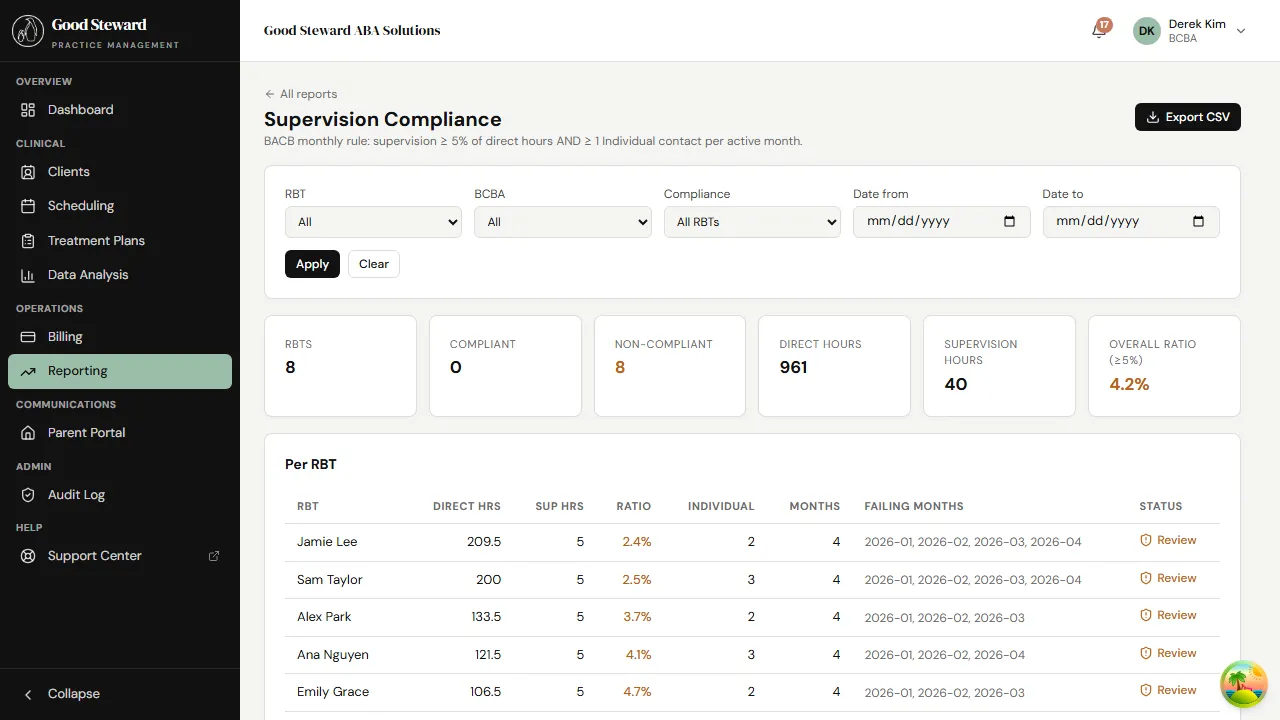
Each row is one RBT-month with:
- Direct hours — total RBT direct-service hours that month
- Supervision hours — hours of supervision the RBT received
- % supervision — supervision / direct (the 5% threshold)
- Individual contacts — count of Individual-type supervision
- Status — Compliant, Below 5%, or No Individual contact
A row is flagged whenever any of the rules fails:
- Below 5% — total supervision hours fell short of the hour requirement.
- No Individual contact — even if the hour total is fine, zero individual sessions = non-compliant.
Clearing flags
Section titled “Clearing flags”When the report flags a month, you have a few options:
- Schedule the missing supervision before the month closes — best case, the rule is satisfied within the same calendar month.
- Document a make-up session in the next month — possible, but the BACB expects the current month to stand on its own; treat make-ups as the exception.
- Investigate a tracking error — if the data looks wrong, check whether a supervision session was logged under the wrong type (e.g. “concurrent” vs “dedicated”) or against the wrong RBT.
The report is read-only — you don’t “clear” a flag in the report. You fix the underlying data (book + finalize the missing session) and the flag disappears next time the report runs.
A practical monthly cadence
Section titled “A practical monthly cadence”Most practices that stay clean on supervision do roughly this:
- Week 1: at least one Individual concurrent observation per RBT.
- Week 2 / 3: dedicated supervision meetings, biweekly per RBT.
- End of month: open the compliance report, fill any gaps before the month closes.
Build it into the calendar template at the start of the year and the report stays green.
What “compliant” doesn’t cover
Section titled “What “compliant” doesn’t cover”The report enforces the BACB hour/contact rule. It does not check:
- Whether the supervision content was clinically meaningful (that’s on you).
- Whether the RBT’s competencies are advancing (use a separate competency tracker — that’s not built into Good Steward yet).
- Whether the supervision was billed correctly (check the Billing surface for that — concurrent supervision under 97155 needs an active 97155 auth on the client).